NTT DATA · Digital Workplace Services
Brought to you by Vlasta Pitro · Senior Solution Architect

Unlocking the value of your
Microsoft 365 & Copilot
investment

You've invested heavily in Microsoft 365. The harder question is what you're getting back — today, not at renewal.

01
Visibility is fragmented
License data lives in one portal, activity in another, security in a third. No one can produce a single current view — ever.
02
Decisions wait for renewal
Optimisation, persona alignment and Copilot rollout get parked until the next true-up — by which point the data is twelve months stale.
03
ROI conversations get awkward
Finance asks what the return on Copilot is. The answer is anecdotes — not a number you can defend on a Tuesday.
Scroll to explore

Three commitments. One outcome:
decisions, not more questions.

We pull the actual data from your tenant — not assumptions, not estimates — and translate it into a view a business owner and an IT lead can both read and act on in the same meeting.

01
Validate
We pull the actual data from your tenant — licensing, activity, devices, security, Copilot — not assumptions, not estimates.
Your data · Your truth
02
Visualise
We translate raw telemetry into a view a business owner and an IT lead can both read — and act on — in the same meeting.
Automated · Benchmarked
03
Enable
Every insight ships with a recommended next step. The report ends with valid actions — leaving you with clear direction, not another open question.
Action-oriented · Clear next steps

Value isn't unlocked when you buy.
It's unlocked along the journey.

Most organisations sit somewhere between deployed and optimised. Value Insights meets you where you are and moves you forward.

Stage 01
Deployed.
Deployed
Licenses are bought, services are switched on. Usage is unmeasured. Governance is informal.
Where most clients start
Stage 02
Measured.
Measured
A single view across licensing, identity, usage and security. Baselines set. Wastage made visible.
Value Insights — first cycle
Stage 03
Optimised.
Optimised
Personas aligned, dormant seats reclaimed, Secure Score lifted, JML processes governed.
Value Insights — quarterly cadence
Stage 04
Transformational.
Transformational
Copilot landed in real work, AI ROI defensible, license posture compounding into business outcomes.
Sustained partnership

A single reporting layer
across your Microsoft estate.

Delivered as a service, not a product to deploy. We run Value Insights against your tenant and present the output. No new agents, no new admin overhead. Two domains, one conversation.

Read-only access to your M365 telemetry
You export CSV reports from the M365 Admin Center and share them with us. No tenant access, no delegated permissions, no agents required.
Refreshed monthly, quarterly, or on demand
Trend lines and progress tracked against prior cycles — not just a point-in-time snapshot. See momentum, not just the current state.
Output tuned for executive and IT audiences
A single session that makes sense to a CIO and a platform engineer simultaneously — with findings paired to concrete next-step recommendations.
Solution Architect on every call
Not a report in your inbox. A live playback with a Senior Solution Architect who can answer questions and scope follow-on work in the same conversation.
M365 Tenant Value Insights
Live dashboard
M365 Value Insights Overview dashboard
M365 Copilot Insights
Live dashboard
M365 Copilot Insights header
365 Value Add
Across everything you're paying Microsoft for today —
where is the value showing up, and where is it not?

Multiple data domains.
An improved view of your tenant.

Every SKU, every assignment, every usage pattern, every governance gap — costed against your CSP or EA pricing and mapped against what you're actually getting from your investment.
01
Licensing Posture
Every SKU, every assignment, every duplicate, every dormant account — costed against your CSP or EA pricing.
02
Active User Behaviour
Who is actually logging in, by application, and how that maps to the licenses you're paying for.
03
Identity & JML Processes
Joiners, movers, leavers — mapped against licensing and group assignment to surface governance gaps and orphaned accounts.
04
Device & Endpoint Readiness
Intune and MECM coverage, end-of-support OS, Windows 11 readiness — sequenced for the modernisation conversation.
05
Service Consumption
Mailbox, OneDrive, SharePoint and Teams — where work actually happens, where storage is growing, and where seats sit idle.
06
Secure Score Posture
Your current security position against Microsoft's benchmark, with a prioritised improvement list.
License Overview & Optimisation
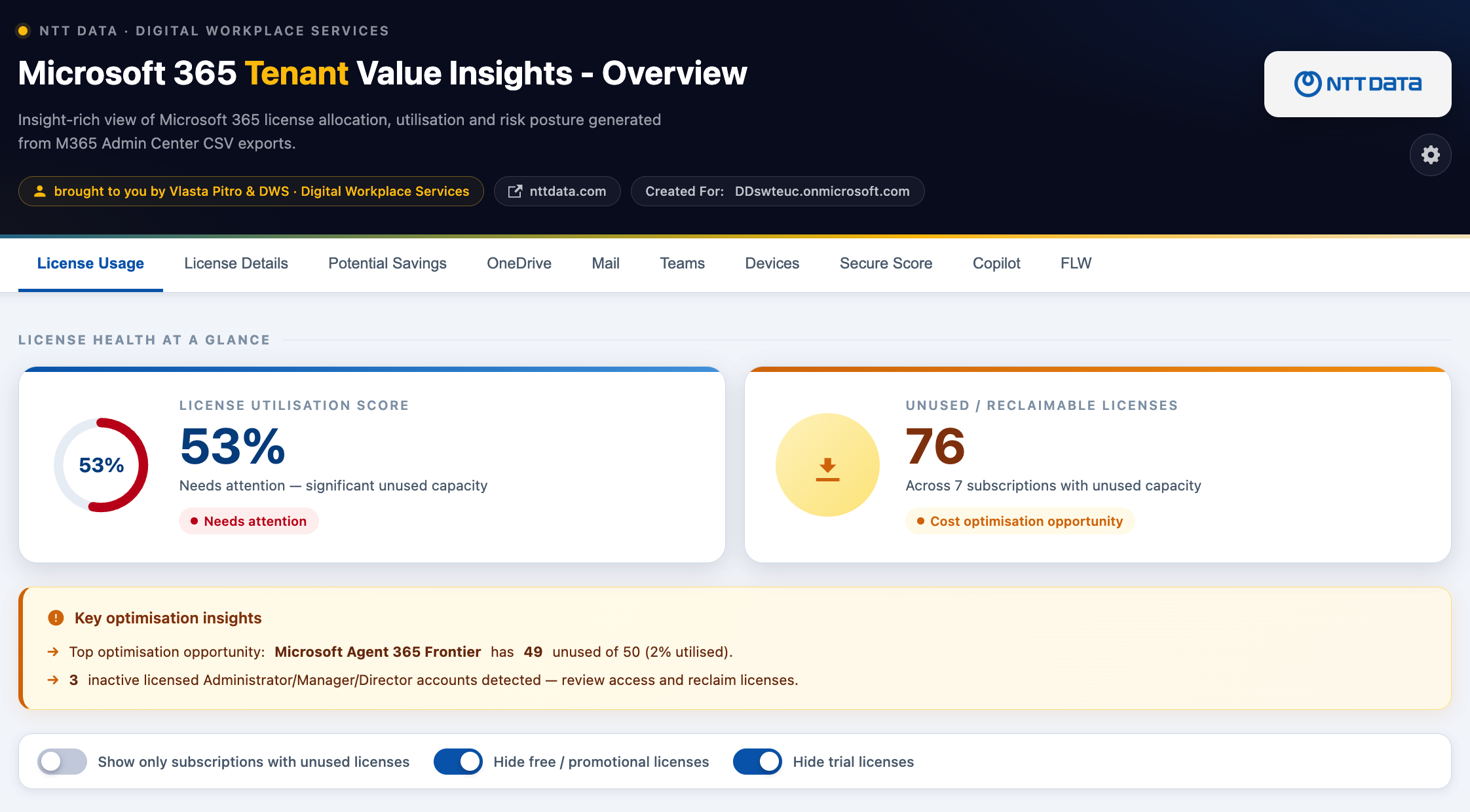
License Usage tab
License overview and health dashboard
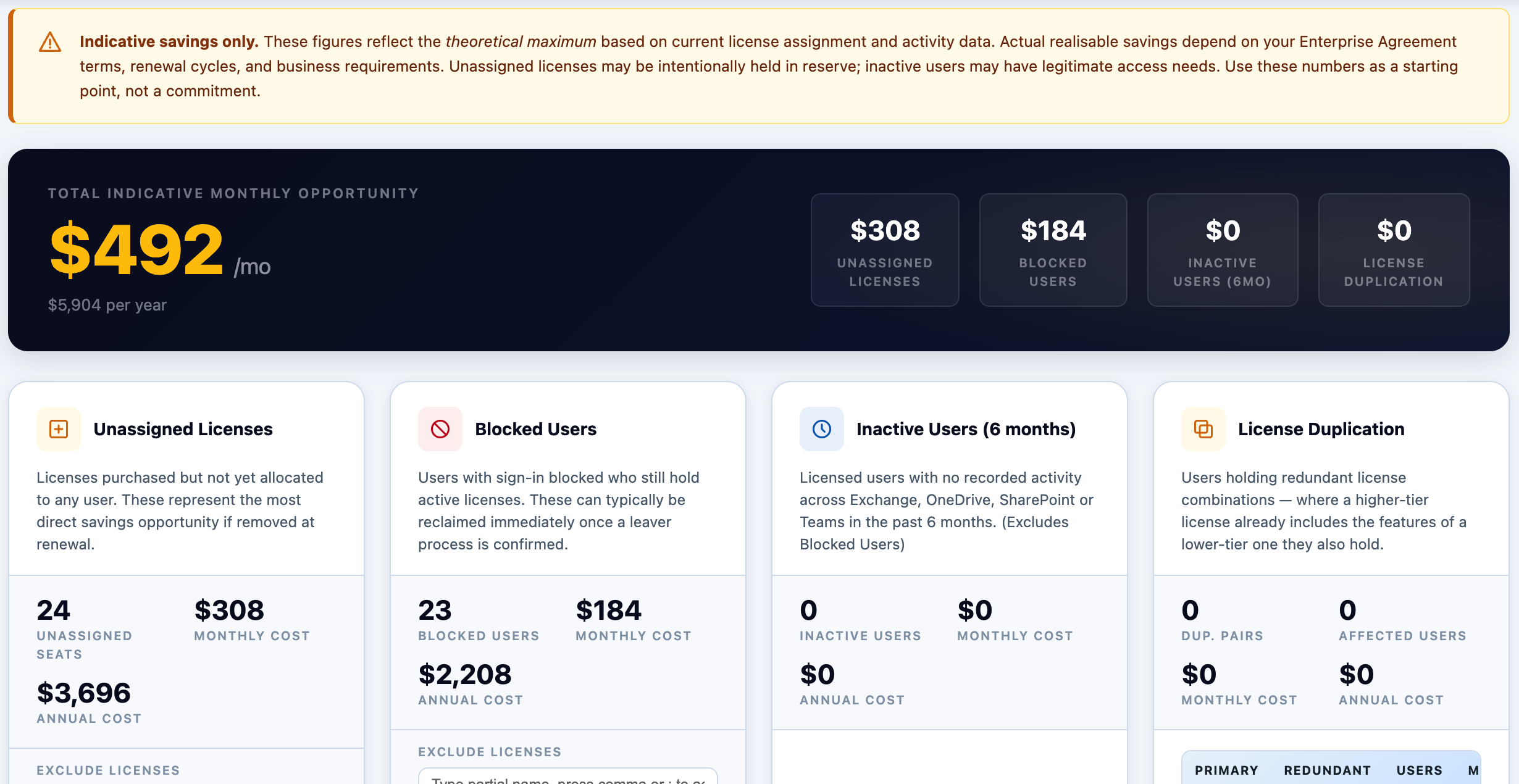
Potential Savings — Indicative
Potential Savings tab
Potential savings breakdown dashboard
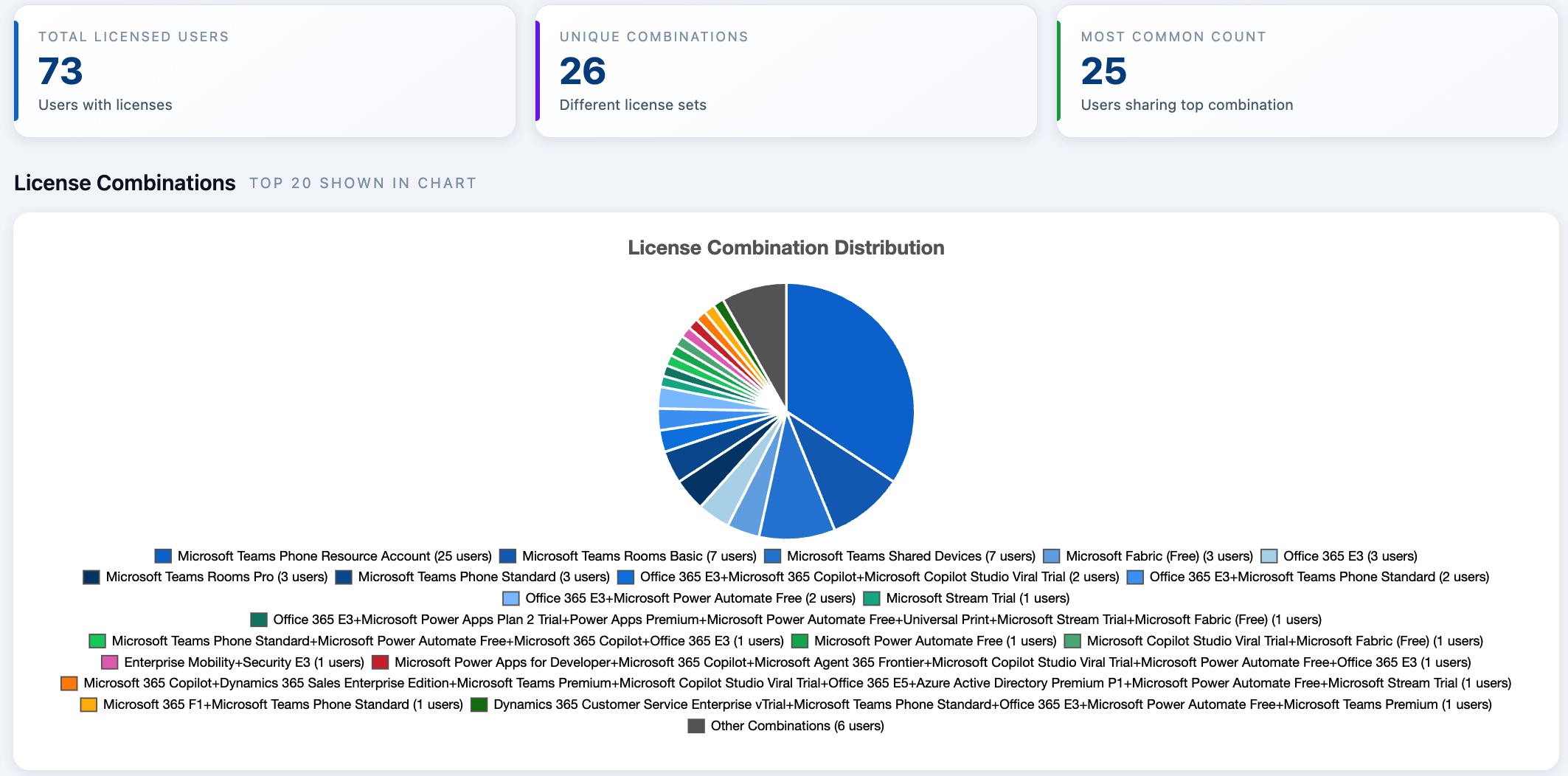
License Combination Distribution
License Details tab
License combination pie chart
Copilot Value Add
You bought Copilot expecting a productivity lift.
The question now is whether prompts are actually flowing — and where they're coming from.

Four lenses on where your
Copilot prompts are flowing.

Prompt volume, app sources, idle seats, and champion cohorts — everything you need to move from "we rolled out Copilot" to "here's where it's actually being used."
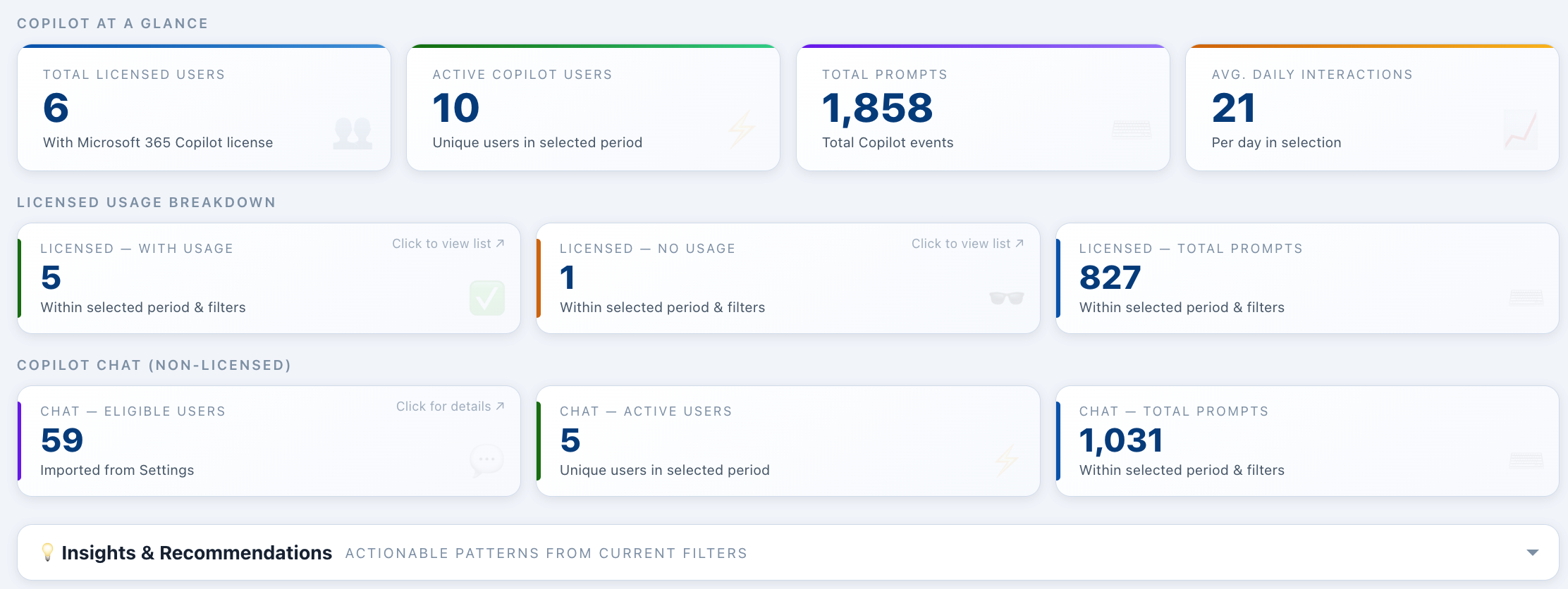
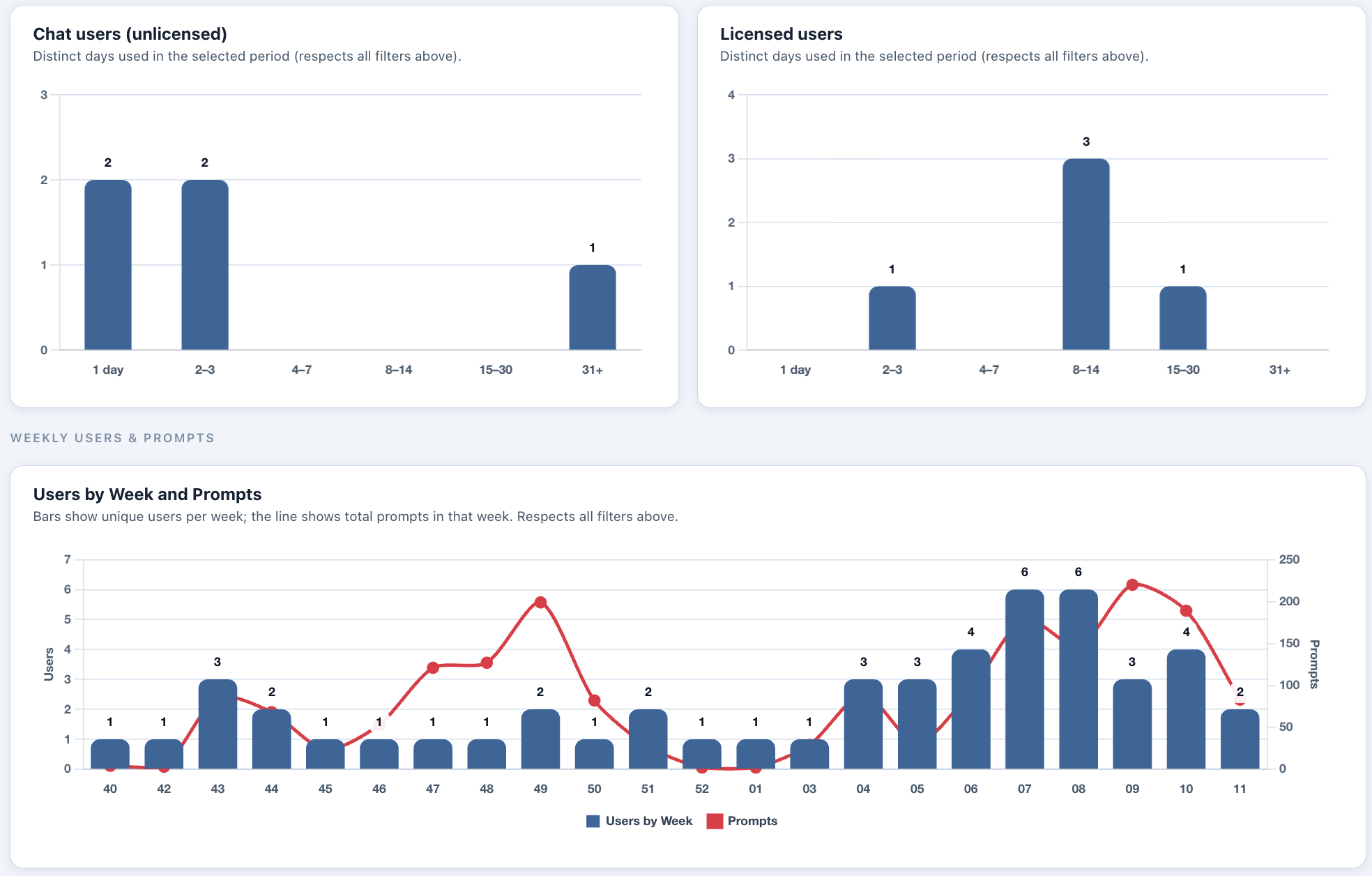
01 — Prompt volume & thread depth
Prompts per week per user, conversation depth, and decomposition by department, location and role — so stalls show up early.
Total prompts, by team, by user, trended week-on-week — so steering committees see momentum, not anecdotes.
02 — Prompt source by app
Where prompts originate — Word, Excel, Outlook, Teams, PowerPoint, Loop, or the standalone Copilot app.
Which apps your prompts come from — so you can see whether Copilot has landed in document work, chat, or only the standalone app.
03 — Active vs. idle seats
Who has a Copilot license assigned, who is actually prompting, and who has gone quiet — ready to reclaim or re-assign.
The precise list of idle seats to reclaim, re-assign, or target for enablement — with evidence, not guesswork.
04 — Champions & cohorts
Who your high-adopters are, where they sit — by department, location and role — and who's a candidate to amplify, train, or expand seats to.
Identify your Copilot champions and understand early adoption patterns to focus training where it will have the greatest impact.
Copilot Overview — at a glance
Overview tab
Copilot licensed users and prompt stats
Weekly Users & Prompts — trend
Adoption Metrics
Users by week and prompts chart
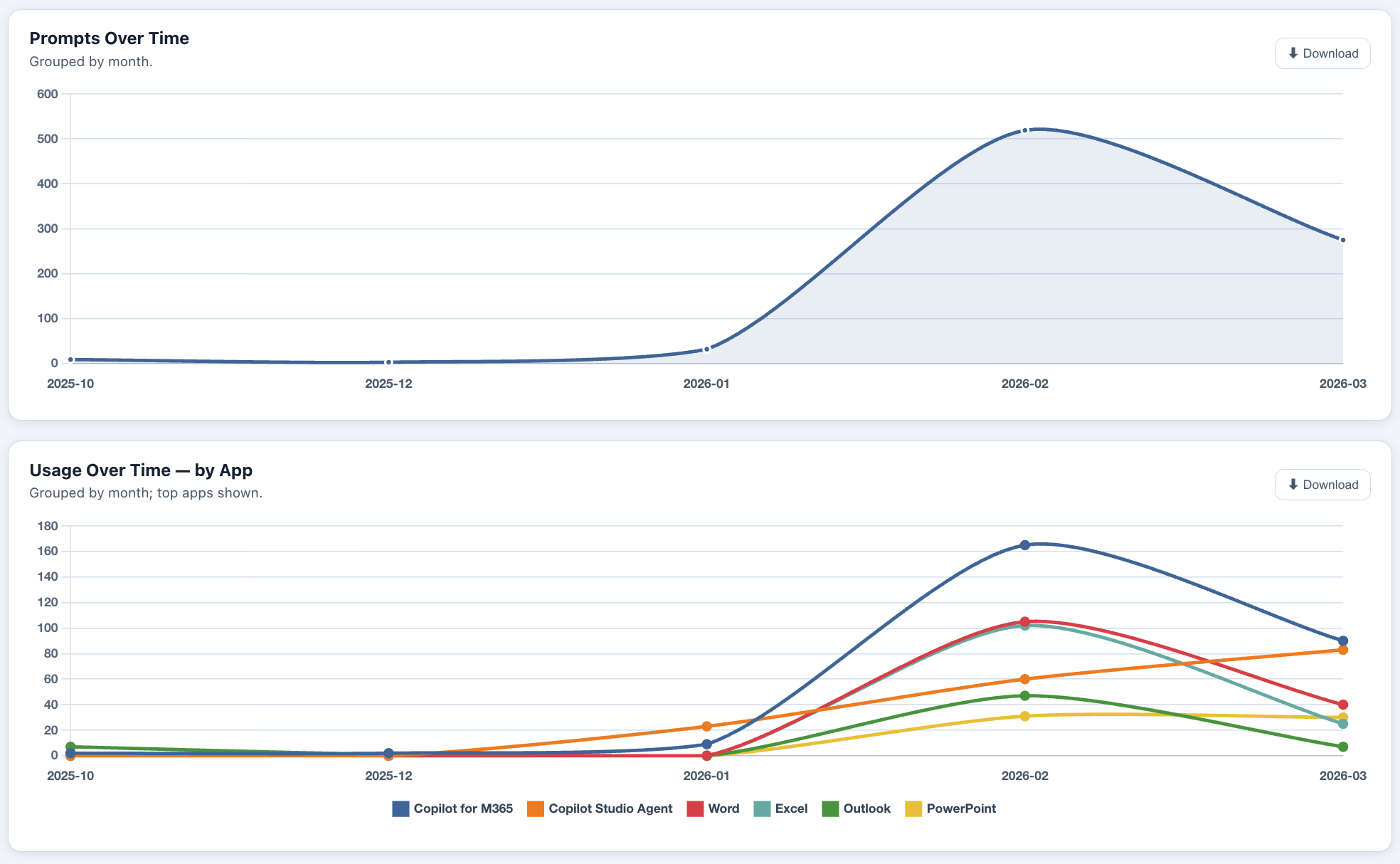
Prompts Over Time & Usage by App
Adoption Metrics
Prompts over time and usage by app charts

Ready to see what your
data is telling you?

Three steps from today to clear, prioritised decisions about your Microsoft 365 and Copilot investment — powered by your own tenant data.

Step 01
Provide the data extracts
We provide you with a detailed guide to export reports from the M365 Admin Center, or you provide us with read access to your tenant. Guided, simple, and takes less than an hour.
Step 02
Setup assessment playback meeting
Set up a 90-minute session to run through the Value Insights together. A Senior Solution Architect walks your team through every finding with context and recommendations.
Step 03
Receive your detailed report
A detailed written report is provided along with recommended next steps — ready to share with procurement, finance, or the board. Not a slide deck to file away.
"
Value Insights helps customers understand what they own, what they use, where value is being lost, and how to unlock more from Microsoft 365 and Copilot — with confidence.
Ready to unlock your insights?
Let us show you what your data is telling you
You bring the reports from M365 Admin Center. We deliver the analysis, the narrative, and the clear recommended actions — in plain language your leadership team can act on.
Download presentation (internal use)